


Programmatic retargeting measurement is the process of attributing user re-engagement, conversions, and revenue to paid retargeting campaigns. MMPs (Mobile Measurement Partners) use re-attribution rules, inactivity windows, and re-engagement windows to determine which campaign receives credit when an existing user returns to an app.
Unlike user acquisition attribution, re-attribution determines which paid retargeting campaign successfully brought an existing user back into the app.
Measuring programmatic retargeting is often perceived as complicated, but the fundamentals are surprisingly straightforward. Once you understand how MMP attribution, inactivity windows, and re-engagement windows work, measuring retargeting performance becomes much easier. The truth is that retargeting measurement is simpler than it sounds – understanding a few key concepts gets you 90% of the way there.
In this article
How MMP Attribution Works in Mobile Retargeting?
At its core, mobile retargeting attribution is straightforward. When an inactive user returns to your app after interacting with a retargeting ad, the MMP records a re-attribution (or re-engagement) event and credits that return to the retargeting campaign.
What often confuses marketers is dual attribution. After a successful re-attribution, subsequent in-app events and revenue can be attributed to both the original user acquisition source and the retargeting campaign. This isn’t a reporting error – it’s standard MMP behavior that helps measure the impact of both acquisition and re-engagement efforts.
Because dual attribution can make reporting more complex, MMPs provide attribution flags like is_primary_attribution to distinguish UA from retargeting performance. Configuring these correctly before scaling campaigns makes reporting significantly easier.

“In Singular, advertisers can view the dual attribution results in their reports by either using the default Dynamic Source (attributed to the last re-engagement), or choosing the Original Source (attributed to the original install attribution). The most important configurations to get right as part of the setup are the Attribution Windows and Re-Engagement Inactivity Window – both are easy to view in Singular’s Partner Configuration.”
Eran Friedman, CTO & Co-Founder at Singular
Two settings decide what counts as a re-engagement: the inactivity window and the re-engagement window.
What is the Inactivity Window?
The inactivity window defines how long a user must remain inactive before becoming eligible for retargeting. It’s one of the most important settings in any retargeting campaign because it determines whether users are classified as active or dormant.
Most MMPs use a default inactivity window of seven days. If a user returns before that period expires, the MMP won’t count it as a re-engagement because the user is still considered active.
In real life, there is no universal inactivity window. The optimal timing depends on your app’s user behavior, monetization model, and LTV curve. Rather than relying on defaults, leading teams use lifecycle data to identify when users are unlikely to return organically.
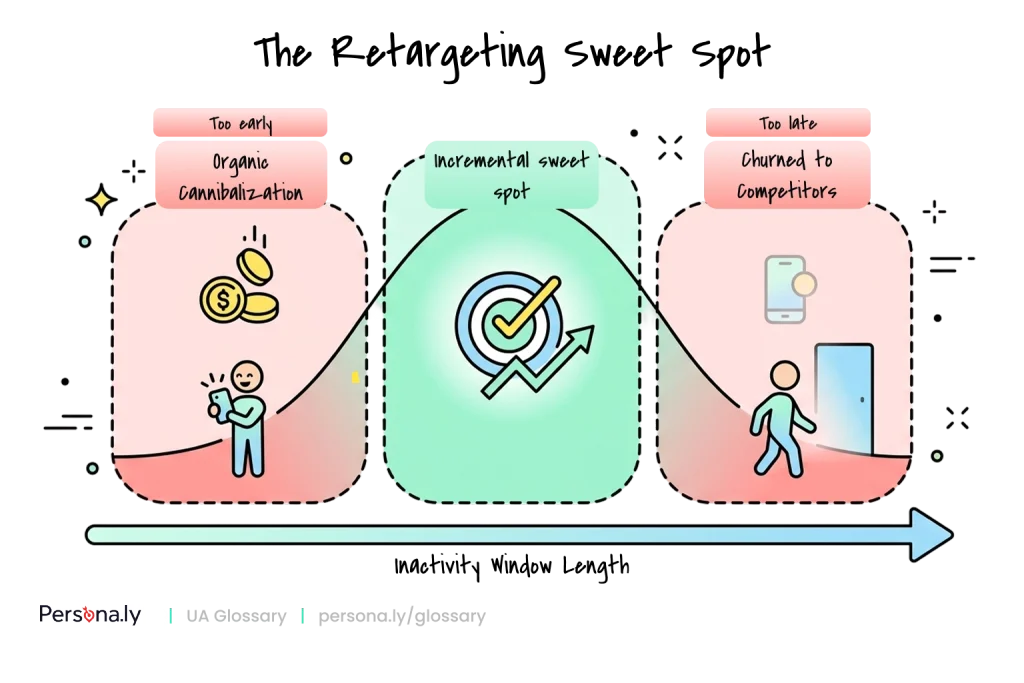
Timing is critical. Retarget too early, and you risk paying for users who would have returned on their own. Wait too long, and competitors may capture their attention before you have the chance.
What’s actually moving the needle:
- Data-led lifecycle mapping is now the baseline. Today’s best-performing teams rely on data rather than guesswork. They use cohort analysis to identify the “organic return cliff” – the point at which users become unlikely to return without intervention – and validate their strategy through incrementality testing.
- Incrementality testing is non-negotiable. Without it, you can’t separate true retargeting impact from users who would have returned anyway – or properly evaluate partner performance.
- Competitive pressure is pushing earlier windows in some verticals. In crowded categories, teams are testing day 4–5 re-engagement, where waiting longer often means losing the user for good.
Here’s the critical part: there is no one-size-fits-all inactivity window. Different verticals and monetization models require custom tailoring aligned with your app’s unique LTV and payback curve. If your app relies on quick, high-frequency conversions with a fast recoup cycle, retargeting campaigns should deploy quickly, which justifies a shorter inactivity window. In contrast, if your app’s conversion cycle is longer and recoup is slow, extend the inactivity window to delay your retargeting campaigns and give users ample time to mature organically
A casual puzzle game typically benefits from a shorter inactivity window. With quick gameplay loops and fast ad-based monetization, users churn rapidly, making early retargeting more effective. A competitive 3v3 battle game, on the other hand, often requires a longer inactivity window. Players may naturally return for guild activities, live events, or weekly tournaments, making premature retargeting unnecessary.
The same logic applies outside gaming: a quick-commerce grocery app with a 2–3 day natural purchase cycle might treat users as dormant after 4–5 days, while an OTA/travel app – where booking cycles span weeks – might set 21–30 days to avoid paying for users who were always going to book their next trip organically.
A key responsibility of any DSP is respecting the MMP-defined inactivity window. Otherwise, advertisers risk paying to re-engage users who were never truly dormant.
What Is the Re-engagement Window?
The re-engagement window determines how long a user’s in-app events continue to be attributed to a retargeting campaign after they return.
Most MMPs default to a 30-day re-engagement window, during which in-app events are typically attributed to both the retargeting campaign and the original acquisition source through dual attribution. After that, events revert to the UA attribution source.
While 30 days is a reliable starting point for most apps, the ideal re-engagement window depends on your users’ behavior and purchase cycle. As with inactivity windows, testing and optimization are key.
The Most Expensive Mistakes in Retargeting
The tricky part is that setting your inactivity window incorrectly leads to two costly extremes: retargeting too soon or too late.
Retargeting Too Soon Leads to Organic Cannibalization
Setting the inactivity window too short can lead to organic cannibalization – serving ads to users who would have returned organically through organic behavior or CRM campaigns. Instead of driving incremental growth by isolating the high-intent cohorts who genuinely require an external nudge, you risk inflating your on-paper campaign metrics while draining your ad spend – essentially paying twice for the same user.
Therefore, retargeting users before they are actually dormant is the most expensive mistake a mobile growth team can make; you are effectively spending your budget to subsidize conversions your CRM would have captured anyway.
The fix is straightforward: let users complete their natural conversion journey before activating retargeting. If most purchases happen within five days of installation, launching retargeting on day two will not generate incremental value. Wait until after that conversion window closes before activating retargeting.
For maximum efficiency, exhaust owned channels such as push notifications and email before investing in paid retargeting. Make sure that it functions as a strategic layer to support and accelerate growth rather than a vanity metric.
Retargeting Too Late = Losing to Competitors
In a saturated market, there is an all-out race for users, so waiting too long can be just as costly. As users remain inactive, the likelihood of permanent churn – and switching to a competing app – increases. In competitive verticals, even a few days can make a measurable difference. The math is simple: the longer the user is gone, the more difficult it is to bring them back.
The most successful teams continuously test different inactivity and re-engagement windows, measure incrementality, and refine their strategy based on cohort performance to find the sweet spot. There is no universal setting – only the one that delivers the highest incremental ROAS for your app.
FAQ
How is programmatic retargeting measured?
Through MMP re-attribution: when a dormant user interacts with a retargeting ad and returns to the app, the MMP credits that return – and subsequent in-app events within the re-engagement window – to the retargeting campaign.
What is re-attribution?
Re-attribution is the MMP process of crediting a user’s return to an app to a retargeting campaign, applying rules such as the inactivity window and re-engagement window. It’s the retargeting equivalent of install attribution in UA.
What is an inactivity window?
The minimum period a user must remain inactive before becoming eligible for retargeting attribution. Most MMPs default to 7 days, but the optimal setting depends on your app’s conversion cycle and LTV curve.
What is a re-engagement window?
The period after re-attribution during which the user’s in-app events continue to be credited to the retargeting campaign – typically 30 days by default.
What is dual attribution?
Standard MMP behavior in which, after re-attribution, in-app events are credited to both the original UA source and the retargeting campaign. Flags like is_primary_attribution separate the two in reporting.
Why is incrementality important in retargeting?
Because many retargeted users would have returned organically. Incrementality testing isolates the lift genuinely caused by ads, preventing budget from subsidizing conversions that would have happened anyway.
What happens if the inactivity window is too short?
You pay to “re-engage” users who were never truly dormant – organic cannibalization. Reported ROAS looks strong while incremental value is near zero.
What happens if the inactivity window is too long?
Users churn permanently or switch to competitors before your ads reach them, and reactivation becomes harder and more expensive.
Should the inactivity window be the same for every app?
No. It should reflect your app’s natural usage rhythm: high-frequency apps (casual games, delivery) suit shorter windows; long-cycle apps (travel, subscription) suit longer ones. Test and validate with incrementality.
